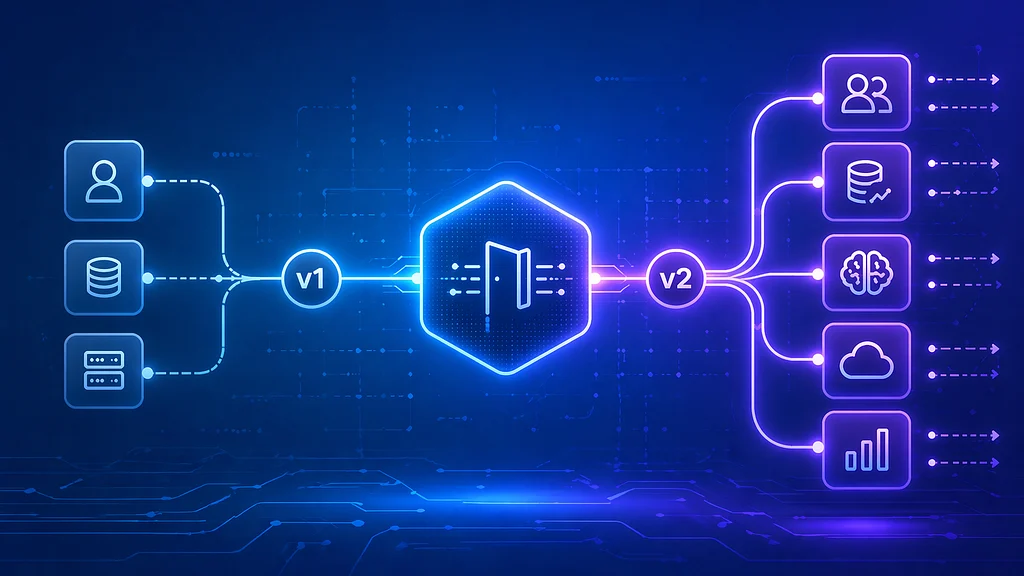
Implement API versioning in .NET 10 Minimal APIs without hiding contract decisions behind framework defaults.
A field rename, changed status code, or stricter validation rule can break mobile apps, dashboards, and partner integrations even when the server deployment itself succeeds.
Versioning gives clients a controlled migration path. It does not make every change safe, and it does not replace contract tests, communication, or a retirement policy.
This guide uses .NET 10, which is an active LTS release as of this review, and the Asp.Versioning libraries. It focuses on explicit URL-segment versions because they are visible in requests and operational tooling. Header and media-type strategies remain valid when the contract requires them.
What Should a Version Cover?
An API version identifies a contract, including:
- Routes and supported HTTP methods
- Request and response schemas
- Validation and domain semantics
- Status codes and error representations
- Authentication and authorization requirements
Not every change requires a new version. A new endpoint or an optional response field is often backward compatible, but compatibility depends on real clients. Some generated clients reject unknown fields; a "bug fix" can break consumers that relied on the previous behavior; and adding a required request field is breaking even if it has a server-side default elsewhere.
Use consumer contract tests and an OpenAPI diff as evidence. Do not rely only on a generic checklist.
A Versioning Policy
A useful baseline is:
- Introduce a new major API version for intentional breaking changes
- Prefer additive changes within a version
- Document what compatibility means for your clients and serializers
- Give every supported version security fixes
- Publish deprecation and sunset dates before retirement
- Measure usage before removal
Do not version "just in case." Every live version multiplies documentation, tests, monitoring, security work, and support effort.
Why URL Segments Here?
This guide uses routes such as /api/v1/products because they are explicit in logs, browser tools, gateways, and cache keys.
There is one important consequence: a URL segment cannot be omitted and then inferred from DefaultApiVersion. The current ASP.NET API Versioning documentation explicitly notes that URL-path versions must be declared in the URL. AssumeDefaultVersionWhenUnspecified is intended primarily for compatibility with an existing unversioned service, not as a convenience for a new URL-segment API.
Packages
For the Swashbuckle-based example, install:
dotnet add package Asp.Versioning.Http
dotnet add package Asp.Versioning.Mvc.ApiExplorer
dotnet add package Swashbuckle.AspNetCore
Pin versions through your normal dependency-management process rather than copying an article's latest version number. The sample uses the current Swashbuckle 10 namespace layout. .NET 10 also has first-party OpenAPI generation through Microsoft.AspNetCore.OpenApi; Asp.Versioning.OpenApi can integrate version descriptions and policies with that stack. Swashbuckle remains a valid choice when your project already uses it.
A Complete Minimal API Setup
The following setup defines two versions, maps a different response contract for each, reports supported/deprecated versions, and creates one Swagger document per version.
using Asp.Versioning;
using Asp.Versioning.ApiExplorer;
using Microsoft.Extensions.Options;
using Microsoft.OpenApi;
using Swashbuckle.AspNetCore.SwaggerGen;

var builder = WebApplication.CreateBuilder(args);

builder.Services
    .AddApiVersioning(options =>
    {
        options.ApiVersionReader = new UrlSegmentApiVersionReader();
        options.ReportApiVersions = true;

        options.Policies
            .Deprecate(1.0)
            .Effective(2026, 9, 20);

        options.Policies
            .Sunset(1.0)
            .Effective(2027, 11, 1);
    })
    .AddApiExplorer(options =>
    {
        options.GroupNameFormat = "'v'VVV";
        options.SubstituteApiVersionInUrl = true;
    });

builder.Services.AddEndpointsApiExplorer();
builder.Services.AddSwaggerGen();
builder.Services.ConfigureOptions<ConfigureSwaggerOptions>();

var app = builder.Build();

var versionSet = app.NewApiVersionSet()
    .HasDeprecatedApiVersion(1.0)
    .HasApiVersion(2.0)
    .ReportApiVersions()
    .Build();

var productsV1 = app
    .MapGroup("/api/v{version:apiVersion}/products")
    .WithApiVersionSet(versionSet)
    .MapToApiVersion(1.0);

productsV1.MapGet("/", () =>
    TypedResults.Ok(new[]
    {
        new ProductResponseV1(1, "Mechanical keyboard", 129.00m),
    }));

var productsV2 = app
    .MapGroup("/api/v{version:apiVersion}/products")
    .WithApiVersionSet(versionSet)
    .MapToApiVersion(2.0);

productsV2.MapGet("/", () =>
    TypedResults.Ok(new[]
    {
        new ProductResponseV2(
            1,
            "Mechanical keyboard",
            new MoneyResponse(129.00m, "EUR"),
            "Peripherals",
            true),
    }));

if (app.Environment.IsDevelopment())
{
    app.UseSwagger();
    app.UseSwaggerUI(options =>
    {
        foreach (var description in app.DescribeApiVersions())
        {
            options.SwaggerEndpoint(
                quot;/swagger/{description.GroupName}/swagger.json",
                description.GroupName);
        }
    });
}

app.Run();

public sealed record ProductResponseV1(int Id, string Name, decimal Price);

public sealed record MoneyResponse(decimal Amount, string Currency);

public sealed record ProductResponseV2(
    int Id,
    string Name,
    MoneyResponse Price,
    string Category,
    bool IsAvailable);

public sealed class ConfigureSwaggerOptions(
    IApiVersionDescriptionProvider provider)
    : IConfigureOptions<SwaggerGenOptions>
{
    public void Configure(SwaggerGenOptions options)
    {
        foreach (var description in provider.ApiVersionDescriptions)
        {
            options.SwaggerDoc(
                description.GroupName,
                new OpenApiInfo
                {
                    Title = "Products API",
                    Version = description.ApiVersion.ToString(),
                    Description = description.IsDeprecated
                        ? "Deprecated. Migrate to the current version."
                        : "Current version",
                });
        }
    }
}
The two contracts are deliberately separate records. Returning an entity directly, or reusing one mutable DTO across versions, makes accidental breaking changes much easier.
Requests now resolve explicitly:
GET /api/v1/products HTTP/1.1
Host: api.example.com
GET /api/v2/products HTTP/1.1
Host: api.example.comWith version reporting enabled, responses can include:
api-supported-versions: 2.0
api-deprecated-versions: 1.0
These api-* fields are library conventions, not general HTTP standards. The policy configuration additionally supports the standardized Deprecation and Sunset response fields.
Unsupported and Malformed Versions
Do not promise a custom JSON error unless you have implemented and tested one.
For URL-segment versioning, a route such as /api/v3/products does not match a supported endpoint and the library documents the result as 404 Not Found. The same applies when the value does not satisfy the apiVersion route constraint. For query-string or header versioning, the default unsupported-version response is generally 400 Bad Request, and it can be configured with UnsupportedApiVersionStatusCode.
Whichever strategy you choose, test the actual runtime behavior and document it for clients.
Deprecation Is Not Retirement
Marking a version deprecated tells consumers to migrate; it should not silently change that version's behavior.
var versionSet = app.NewApiVersionSet()
    .HasDeprecatedApiVersion(1.0)
    .HasApiVersion(2.0)
    .ReportApiVersions()
    .Build();
The ASP.NET API Versioning policy API can publish two standards-based fields:
Deprecation: a Structured Field date written as an epoch value prefixed by@Sunset: an HTTP date indicating when the resource is expected to become unavailable
For example:
Deprecation: @1789862400
Sunset: Mon, 01 Nov 2027 00:00:00 GMT
Deprecation: true is not valid RFC 9745 syntax. A deprecation date must not be later than the sunset date. A Link with rel="deprecation" or rel="sunset" can point clients to a migration policy.
If you add headers manually, do it before the response starts and only for endpoints in the affected version. Framework policy support is preferable because it keeps version metadata and response reporting together.
Header Versioning as an Alternative
To read a custom request header:
options.ApiVersionReader = new HeaderApiVersionReader("X-Api-Version");The route no longer contains a version segment:
GET /api/products HTTP/1.1
Host: api.example.com
X-Api-Version: 2.0
Header versioning keeps the resource URI stable, but versions are less visible during manual testing and every relevant cache must distinguish responses by the version header. Configure cache keys or Vary behavior correctly. Custom request headers also trigger CORS preflight in cross-origin browser scenarios unless the request is otherwise simple.
Media-type versioning can be appropriate when the version describes a representation rather than the resource as a whole. Query-string versioning is easy to adopt for an existing API. There is no universally correct strategy; consistency is more valuable than mixing strategies without a contract reason.
Keep Versioned Endpoints Modular
As the API grows, move mappings out of Program.cs without hiding version declarations:
public static class ProductEndpoints
{
    public static IEndpointRouteBuilder MapProductEndpoints(
        this IEndpointRouteBuilder app,
        ApiVersionSet versions)
    {
        app.MapGroup("/api/v{version:apiVersion}/products")
            .WithApiVersionSet(versions)
            .MapToApiVersion(1.0)
            .MapGet("/", GetV1);

        app.MapGroup("/api/v{version:apiVersion}/products")
            .WithApiVersionSet(versions)
            .MapToApiVersion(2.0)
            .MapGet("/", GetV2);

        return app;
    }

    private static IResult GetV1() => Results.Ok(Array.Empty<ProductResponseV1>());

    private static IResult GetV2() => Results.Ok(Array.Empty<ProductResponseV2>());
}
Keep business logic behind shared application services where behavior is genuinely shared. Keep transport contracts version-specific.
Security Across Versions
A deprecated endpoint remains an attack surface until it is removed.
- Patch critical vulnerabilities in every supported version
- Apply current authentication, authorization, rate limiting, and input limits consistently
- Verify that older response contracts do not expose data removed from newer versions
- Inventory dependencies that exist only for old versions
- Accelerate retirement when a version cannot be maintained safely
Versioning protects consumers from uncoordinated contract changes. It is not permission to preserve insecure behavior indefinitely.
Test the Contract, Not Just the Status Code
This test proves only that the route returns 200:
[Fact]
public async Task GetProductsV1ReturnsSuccess()
{
    using var response = await client.GetAsync("/api/v1/products");

    Assert.Equal(HttpStatusCode.OK, response.StatusCode);
}
A production suite should also verify:
- Serialized property names, types, nullability, and required fields
- Error representations and status codes
- Authentication and authorization per version
- Supported, deprecated,
Deprecation, andSunsetfields 404behavior for unknown URL versions- Separate OpenAPI documents and operation inclusion
- No unintended breaking diff against the published contract
Snapshot tests can help, but review snapshots as contracts rather than approving every update mechanically.
Migration Playbook
1. Release
- Ship the new version alongside the old one
- Publish a change log and a concrete migration guide
- Generate and validate a separate OpenAPI document
- Test both versions independently
2. Deprecate
- Mark the old version deprecated in code and documentation
- Announce a deprecation date and a later sunset date
- Contact known consumers through channels they actually monitor
- Stop adding features while continuing security and correctness fixes
3. Observe
- Record the requested version without logging credentials or sensitive payloads
- Track traffic, errors, latency, and known client adoption by version
- Identify migration blockers and test fixes against both contracts
- Do not treat a quiet period alone as proof that every client has migrated
4. Retire
- Remove routing and code for the old version on the announced date
- Use
410 Goneonly when the server knows the resource was intentionally and likely permanently removed; otherwise404may be more accurate - Continue monitoring old-version traffic
- Remove obsolete tests, dependencies, documentation, and dashboards
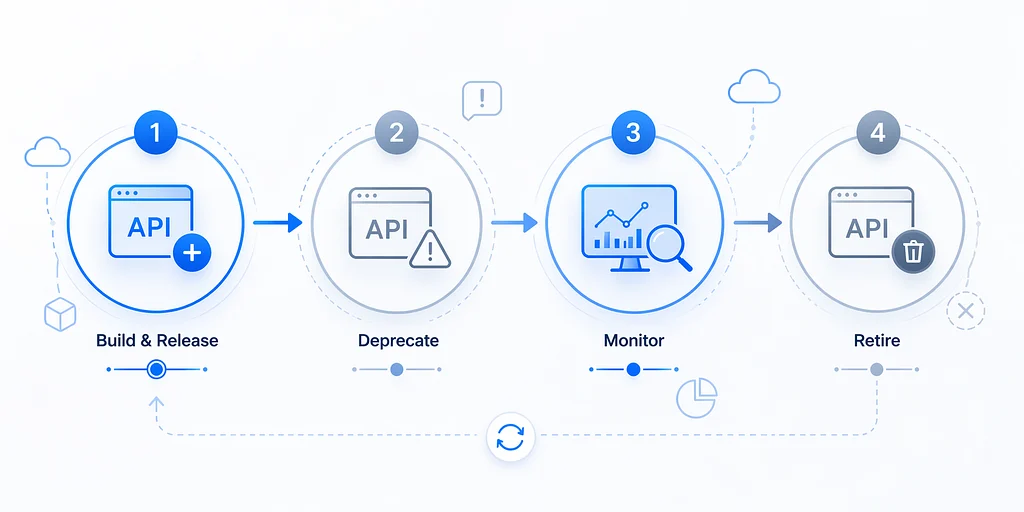
API versioning works as a lifecycle: release, deprecate, observe, and retire.
Final Thoughts
Start with a compatibility policy, not a package. Add versioning when independent clients need a stable contract, choose one discovery strategy, and make every version explicit in code, documentation, tests, and telemetry.
For a new URL-segment API, require the version in the path rather than silently selecting a default. Publish machine-readable deprecation and sunset information, but back it with human communication and measured adoption.
The framework makes version routing straightforward. The production work is maintaining each contract responsibly and eventually deleting it.
References
- Microsoft .NET support policy
- ASP.NET API Versioning: URL path versioning
- ASP.NET API Versioning options
- ASP.NET API Versioning: version policies
- ASP.NET API Versioning: Swashbuckle integration
- Microsoft: OpenAPI support in ASP.NET Core
- RFC 9745: The Deprecation HTTP Response Header Field
- RFC 8594: The Sunset HTTP Header Field