Part 5 of “Building Gaspar - Anatomy of a Business AI Assistant”
Previous: Part 4 - “Guardrails as Architecture: How We Stopped Our Chatbot from Lying About Us”
Building an AI assistant is one challenge. Keeping it running smoothly, cheap to operate, and genuinely helpful once it is live? That is a different game.
When we launched Gaspar, three big questions arose:
- How do we slow bots and abuse without annoying real visitors?
- How do we keep costs bounded when anyone on the internet can hit our endpoint?
- How do we know whether this thing is helping the business?
There was no silver bullet. We built small layers that cover different failure modes. Let’s break them down.
Proof-of-Work: Friction Most Visitors Never Feel
Every question Gaspar answers must include a valid proof-of-work challenge.
The idea is simple: before our server runs retrieval or asks the answer model to generate a response, the visitor's browser has to solve a small cryptographic puzzle. It proves that some client-side computation happened; it does not prove the visitor is human.
- A typical visitor's browser solves it in the background, usually before they submit a question;
- A bot making requests at scale must do the same work repeatedly, increasing the cost of abuse.
We use ALTCHA with PBKDF2/SHA-256 challenges signed by the server. The useful part is the timing: the browser starts preparing a proof when the widget opens, using Web Workers so the main UI remains responsive.
Here is the flow:
- The chat widget opens;
- The browser fetches and solves a challenge in the background;
- The solved proof sits in memory while it remains valid;
- When the visitor submits a question, the proof is normally ready. No popup and no “select all the traffic lights” test.
The server verifies the signature, solution, and five-minute expiry. One important limitation: the current server does not maintain a replay store, so a valid proof is not guaranteed to be single-use. Rate limits remain necessary because proof-of-work raises the cost of abuse; it does not establish identity or stop replay by itself.
Three Layers of Abuse Protection
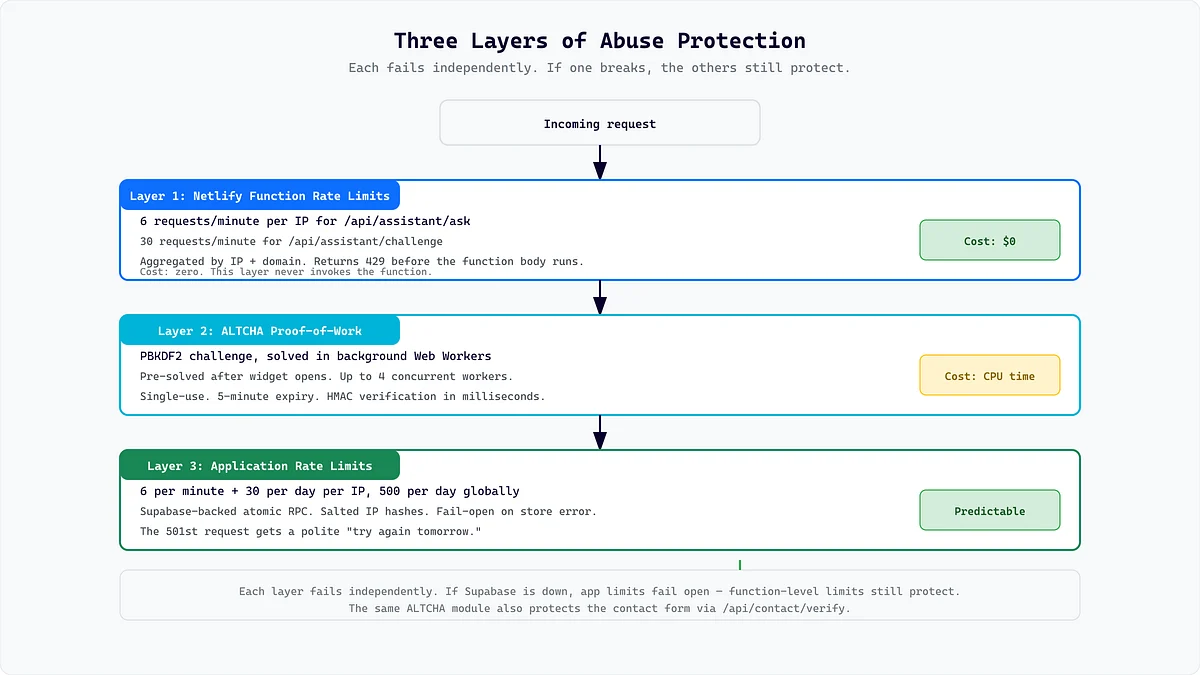
We do not rely on one wall. We use three controls with different responsibilities:
Layer 1 - Platform rate limit: The Netlify function configuration allows 30 requests per 60-second window, aggregated by IP and domain, across the assistant routes handled by that function. A platform rejection returns before our application pipeline runs.
Layer 2 - Application rate limits: Before parsing the question or verifying its ALTCHA proof, our API checks Supabase-backed counters. Defaults are six requests per minute and 30 per day for a hashed IP, plus 500 assistant questions per day globally. Deployments can override those values. IPs are salted, SHA-256 hashed, and truncated before being used in bucket keys.
Layer 3 - ALTCHA verification: Every answer request must carry a valid, unexpired proof. No valid proof means no retrieval, embedding, or answer-generation call.
The application limiter currently fails open if its Supabase RPC errors, by design, so a database hiccup does not make the public assistant unavailable. In that case the platform limit and ALTCHA still apply. That is an availability tradeoff, not a perfect security guarantee.
The same server-side ALTCHA verification also protects the project-brief form on our contact page. The in-chat lead form is a separate Web3Forms flow and does not currently reuse that ALTCHA proof.
Keeping AI Costs Predictable
Running an AI assistant that anyone can use is uncomfortable from a budgeting standpoint. We therefore reject or shorten work before the most expensive path where practical:
- Intent classification uses a model call to keep unsupported or conversational requests out of retrieval, embedding, and full grounded-answer generation;
- Conversation transforms reuse the previous answer for requests such as “make that shorter,” avoiding a new retrieval plan and vector search, although the rewrite still requires a model call;
- Retrieval planning and query embeddings run only for routes that need them;
- Exact technology, commercial, link, latest-blog, and forced-source routes can avoid query embeddings;
- If the primary Gemini embedding model reports quota exhaustion, retrieval switches to a separately indexed fallback Gemini embedding model.
The global daily request ceiling bounds how many questions reach the pipeline. It is not a dollar-denominated provider spending cap: classification, planning, translation, ingestion, and failed calls have different costs. Provider billing alerts and quotas remain separate operational controls.
The takeaway: a public-facing AI feature needs measurable consumption limits. A request ceiling is useful, but teams should not describe one as a precise spending cap unless it is tied to metered cost.
Availability, Fallbacks, and Caching
Gaspar is not “highly available” just because it has one fallback. The answer, intent, planning, rewrite, and translation calls currently depend on DeepSeek. Embeddings use Gemini, with fallback only for a recognized primary-model quota error. Supabase is required for retrieval, while Netlify runs the API adapter. A failure in any required path can still produce a temporary-unavailable response.
Caching is deliberately narrow:
- English UI copy ships with the frontend;
- Translated UI copy is cached in the running server instance and in the visitor's browser, keyed by language and copy version;
- Answer responses and semantic retrieval results are not cached because they depend on the question, conversation, page context, and current knowledge;
- Stored primary and fallback chunk embeddings avoid re-embedding the knowledge base on every question, but each semantic query still needs a query embedding.
This keeps translated interface copy cheap without pretending that a previous answer is always safe to reuse in a new context.
The frontend also sets a 25-second request timeout and shows controlled messages for network, verification, configuration, embedding-quota, and rate-limit failures. For per-user and global daily limits, it can move directly into lead capture so a visitor still has a route to the team. That is graceful degradation, not uninterrupted availability.
The Assistant Is Not Just a Q&A Bot
An assistant that gives accurate answers is useful. An assistant that guides people toward an appropriate next step can support the business too.
Gaspar can return action types with its answer:
book_meetingfor explicit contact-option requests;gaspar_messagefor project, pricing, hiring-ARG, contact, and insufficient-context handoffs;contact_formas one of the explicit contact options;email_hrfor careers questions.
The backend returns the action types and, in one case, an autoStart flag. The frontend maps those types to localized labels and behavior. Business rules and presentation stay separated.
For example:
- Ask how to contact us? Gaspar can offer an in-chat message, meeting link, and contact form;
- Ask about careers? It offers the careers email action;
- Ask about a technology we cannot confirm? It avoids claiming experience, explains that it is outside our usual stack, and offers a handoff rather than inventing an answer.
That is the difference between “I don’t know” and “I cannot confirm that, but here is a safe next step.”
Proactive, Not Pushy
Gaspar does not always wait to be opened. Once the site's loading sequence has completed, ten seconds without scroll, wheel, or touch movement can open a lead-capture offer on any non-contact page. On mobile it opens fullscreen; on desktop it opens as a panel.
Visitors get low-pressure choices:
- Send an email through the guided flow;
- Talk to Gaspar instead;
- Dismiss it.
We respect that choice:
- A normal close suppresses the proactive offer for the browser session;
- “Don’t show me again” suppresses it for two days;
- A successful lead stores a local completion flag and suppresses later offers in that browser.
“Permanently” would be too strong: visitors can clear browser storage or use another browser. The goal is not to nag people into converting. It is to make the next step easy when someone may be ready for it.
Measuring the Funnel Without Putting Messages in GA4
Meaningful funnel interactions are tracked through our analytics service, which uses GA4 by default and can be configured for first-party, dual, or no-op providers. We do not include question, answer, email, or lead-message content in those events; predefined starter questions are represented by stable prompt identifiers rather than their text. The metadata is content-free, but “anonymous” would be too strong a promise for web analytics generally.
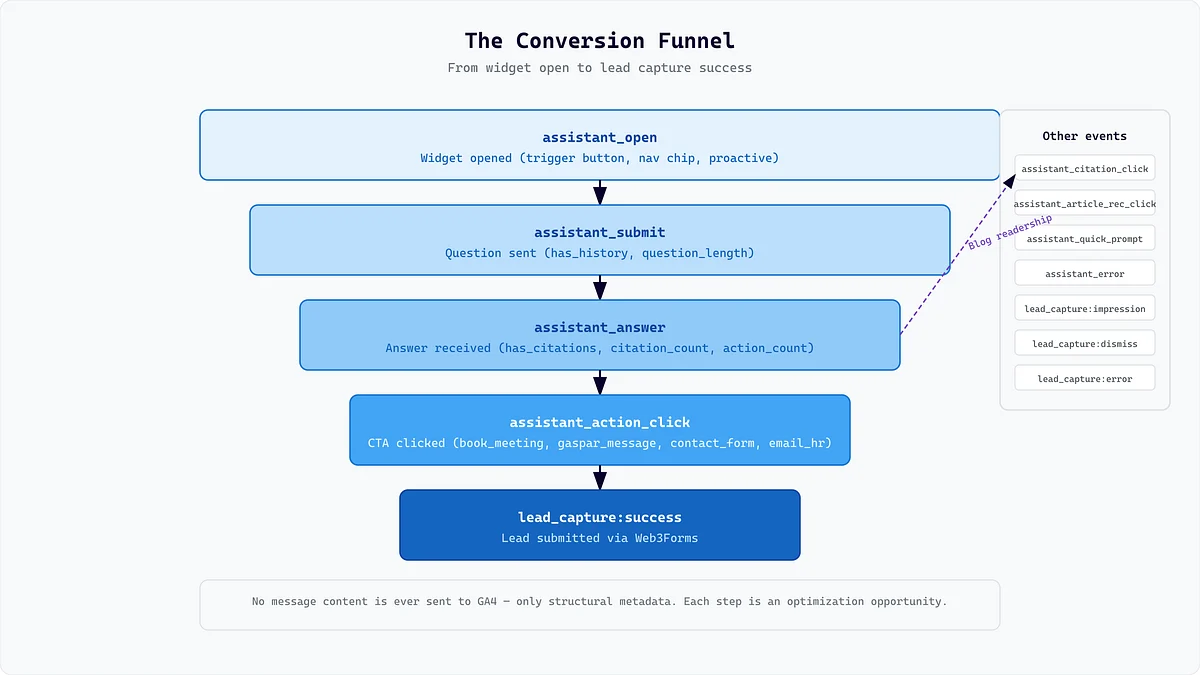
The main events include:
assistant_open- the widget was opened;assistant_submit- a question was sent;assistant_answer- an answer arrived, with citation and action counts;assistant_action_click- a suggested action was clicked;assistant_citation_click- a cited source was opened;assistant_article_recommendation_click- a recommended article was opened;assistant_quick_prompt- a starter question was clicked;assistant_error- a request failed;assistant_lead_capture- tracks actions such asoffer_shown,flow_started,submitted,succeeded,dismissed, andfailed.
Together, those events describe a funnel:
assistant_open → assistant_submit → assistant_answer → assistant_action_click → assistant_lead_capture: succeeded
Each step tells us something different:
- People open the widget but ask nothing? The welcome state may need work;
- People receive answers but never click actions? The actions may not be relevant;
- Leads start but do not finish? The guided flow may have too much friction.
Analytics is not the only logging path. Gaspar periodically saves loggable conversations after eight seconds of inactivity and also attempts a keepalive save when the widget closes, the page becomes hidden, or the page unloads. Those transcripts can include normal chat and lead-capture messages.
They are encrypted before Supabase persistence, the public save endpoint has both platform and application rate limits, and a Discord notification with a short preview is sent only when a visitor conversation is first created. This operational logging is governed by our privacy and retention policy; it should not be confused with content-free analytics.
What Did All This Actually Cost?
The repository can verify which services and cost controls Gaspar uses; it cannot verify an invoice. Our reported low-traffic operating estimate has been roughly $2-$3 per month across Netlify functions, Supabase storage and vector search, DeepSeek model calls, Gemini embeddings, Web3Forms lead delivery, and analytics. Treat that as a point-in-time estimate, not an architectural guarantee. It depends on traffic, model pricing, free tiers, quotas, currency, and which shared service costs are allocated to Gaspar.
The larger cost was engineering time: building the retrieval pipeline, curating sources, setting up guardrails, handling multiple languages, localizing the interface, implementing rate limits, writing tests, encrypting conversation logs, and designing lead capture.
Anyone can put a chat box on a website in an afternoon. It takes care to build one that is grounded, bounded, measurable, transparent about its limits, and tied to useful business outcomes.
Gaspar does not just talk to visitors. It helps them take the next step.
This wraps up the “Building Gaspar” series! Want to see the assistant in action? Head over to arg.software and ask it anything.