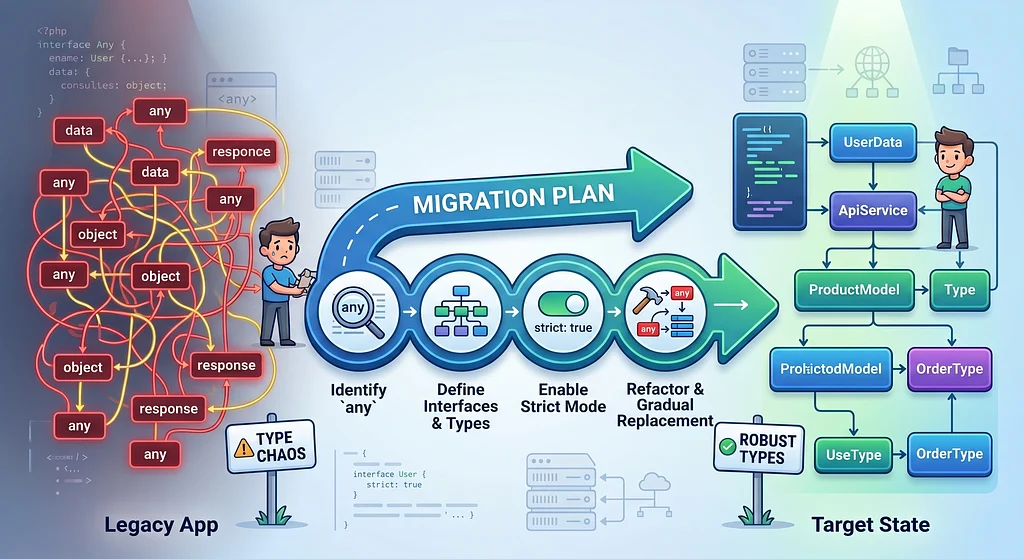
Legacy TypeScript codebases don't become unsafe suddenly. They start to become unsafe one any at a time.
- A rushed API integration.
- A badly typed SDK.
- A JavaScript migration nobody had time to clean up.
- A temporary workaround that somehow became permanent.
Eventually, TypeScript remains in the project, but it is no longer safeguarding the components of the system where accuracy is crucial.
The concern is when any spreads across API contracts, business logic, database models, events, and shared packages. At that point, TypeScript becomes decoration.
This article is not about type purity. It is about removing any from a legacy TypeScript application without rewriting everything from scratch.
Why any Is Dangerous?
any disables TypeScript exactly where you use it.
This compiles:
function calculateDiscount(user: any) {
  if (user.subscription.plan === "premium") {
    return 0.2;
  }
  return 0;
}
But TypeScript can’t tell you when subscription doesn’t exist, is misspelled, or has the wrong type. You only find out at runtime.
A safer version looks like this:
type User = {
  subscription?: {
    plan: "free" | "premium";
  };
};

function calculateDiscount(user: User) {
  return user.subscription?.plan === "premium" ? 0.2 : 0;
}
Now TypeScript helps you.
It knows subscription may be missing, knows the allowed values for plan, and forces the function to handle the data shape correctly.
That is the whole point.
The Real Problem Is Not One any
One or two isolated any incidents are not always a disaster.
The real problem starts when any crosses important boundaries:
async function createPayment(payload: any) {
  const amount = payload.amount;
  const currency = payload.currency;
  const customerId = payload.customer.id;
  // process payment code below
}
This is risky because the function is close to a business-critical flow. Payments. Orders. Authentication. Authorization. Webhooks. Billing. User data. These are precisely the places where you do not want TypeScript to be silent.
A good rule would be:
any is most dangerous at the edges of your system and in the core of your business logic.
So do not migrate randomly.
Migrate by risk.
Step 1: Measure Before You Fix
Before removing any, measure it.
A simple start:
grep -R "any" src --include="*.ts" --include="*.tsx"A better option is ESLint. With the current flat config format, start with a warning across TypeScript files:
// eslint.config.mjs
import { defineConfig } from "eslint/config";
import tseslint from "typescript-eslint";

export default defineConfig({
  files: ["**/*.{ts,tsx}"],
  extends: [tseslint.configs.recommended],
  rules: {
    "@typescript-eslint/no-explicit-any": "warn",
  },
});
Start with warn, not error. Turning every any into a build failure is a great way to make the team disable the rule.
Create a baseline instead:
Current explicit any count: 438
Sprint 1 target: 350
Sprint 2 target: 250
Sprint 3 target: 150
Now the migration is measurable. And measurable work is easier to defend and to target.
Step 2: Stop New any From Spreading
Before fixing old code, prevent new any from entering the codebase. Legacy code can have debt, but new code should not increase the interest rate.
Keep the warning as a baseline, then make the rule stricter in new or critical modules by adding a scoped flat config object:
// eslint.config.mjs
import { defineConfig } from "eslint/config";
import tseslint from "typescript-eslint";

export default defineConfig(
  {
    files: ["**/*.{ts,tsx}"],
    extends: [tseslint.configs.recommended],
    rules: {
      "@typescript-eslint/no-explicit-any": "warn",
    },
  },
  {
    files: ["src/modules/payments/**/*.ts"],
    rules: {
      "@typescript-eslint/no-explicit-any": "error",
    },
  },
);
This is realistic. You are not pretending the legacy codebase is perfect. You are simply saying the following:
From now on, we stop making the problem worse.
Step 3: Replace any with unknown at Boundaries
Data from the outside world should not be trusted. That includes HTTP requests, webhooks, queues, third-party APIs, CSV imports, JSON files, and environment variables.
This is unsafe:
async function parseWebhook(payload: any) {
  return payload.event.type;
}
Use unknown instead:
async function parseWebhook(payload: unknown) {
  if (!isWebhookPayload(payload)) {
    throw new Error("Invalid webhook payload");
  }
  return payload.event.type;
}
With a type guard:
type WebhookPayload = {
  event: {
    type: string;
  };
};

function isWebhookPayload(value: unknown): value is WebhookPayload {
  return (
    typeof value === "object" &&
    value !== null &&
    "event" in value &&
    typeof value.event === "object" &&
    value.event !== null &&
    "type" in value.event &&
    typeof value.event.type === "string"
  );
}
The difference is simple:
any says, “Trust me.”
unknown says, “Prove it first.”
That is undoubtedly what you want at system boundaries.
A quick example using unknown makes the difference clearer:
let value: unknown = "hello";
value.toUpperCase();
This does not compile.
The next segment compiles.
let value: unknown = "hello";
if (typeof value === "string") {
  value.toUpperCase();
}
As you can see, TypeScript forces you to check the value first.
Step 4: Validate External Data at Runtime
TypeScript checks your code. It does not validate JSON coming from an API, webhook, queue, database, or browser storage.
That is why runtime validation matters. A practical and common option is Zod:
import { z } from "zod";

const WebhookPayloadSchema = z.object({
  event: z.object({
    type: z.string(),
  }),
});

type WebhookPayload = z.infer<typeof WebhookPayloadSchema>;

function parseWebhook(payload: unknown): WebhookPayload {
  return WebhookPayloadSchema.parse(payload);
}
Now the flow is safer:
unknown input
→ runtime validation
→ typed data
This is much better than:
const payload = rawPayload as WebhookPayload;Because a type assertion does not validate anything. It only tells TypeScript to stop complaining.
Step 5: Fix High-Risk any First
Not all any usages deserve the same priority.
Priority:
HTTP request bodies
Webhook payloads
Authentication data
Authorization claims
Payment flows
Database records
Shared packages
Public API clients
Message queue events
Configuration objects

These can wait:
One-off scripts
Test mocks
Temporary migration files
Internal build tooling
Prototype code
These priority items can break important flows. Define their types and boundaries first so failures are caught before they reach critical business logic.
A good migration is not random. It is risk-based.
Step 6: Tighten TypeScript Gradually
Do not enable every strict TypeScript option at once in a large legacy codebase. That usually creates hundreds or thousands of errors overnight.
Start with:
{
  "compilerOptions": {
    "noImplicitAny": true
  }
}
noImplicitAny is a useful starting point because it reports places where TypeScript would otherwise infer any. It does not reject an explicit annotation such as payload: any; @typescript-eslint/no-explicit-any covers that separate problem.
Then move toward:
{
  "compilerOptions": {
    "strict": true
  }
}
Once the codebase is stable with noImplicitAny, consider strictNullChecks next, then continue based on the errors and risks in your codebase.
If you'd like, you can also create a new tsconfig, applying strict rules only to new code.
{
  "extends": "./tsconfig.json",
  "compilerOptions": {
    "strict": true
  },
  "include": ["src/modules/new-feature/**/*.ts"]
}
This lets new code follow better rules while legacy code is improved over time.
The Migration Plan
Here is the practical order we would follow:
1. Measure current any usage
2. Add an ESLint warning for explicit any
3. Prevent new any in new or critical modules
4. Replace any with unknown at system boundaries
5. Add runtime validation for external data
6. Fix API clients and webhook handlers
7. Fix authentication, payment, and billing flows
8. Fix shared package exports
9. Enable stricter tsconfig options gradually
10. Add CI checks to prevent regressions
This works because it avoids the biggest migration mistake: trying to make everything perfect immediately.
Make the system safer every week instead.
What Not to Do
- Do not replace every any with unknown blindly.
- Do not replace any with massive interfaces nobody understands.
- Do not enable strict across the whole project without a plan.
- Do not use type assertions everywhere just to make errors disappear.
This is not safety:
const user = data as User;If data is untrusted, validate it. Otherwise, you have only replaced one unsafe pattern with another.
The goal is not to shame people for old code. The goal is to make the codebase safer.
Final Thoughts
You do not need to remove every any this week. But you do need a migration strategy.
- Start by measuring the problem. Stop new unsafe types from spreading.
- Replace any with unknown at system boundaries. Validate external data at runtime.
- Fix high-risk flows first. Tighten your compiler and linting rules gradually.
- Track progress over time.
The goal is not type purity. The goal is confidence. Because TypeScript cannot protect your application if you keep telling it to look away.