Part 1 of 5: “Building Gaspar - Anatomy of a Business AI Assistant”
When we set out to build an AI assistant for ARG Software, we didn’t start with “how do we add a chat widget.” We started with a question: why does our contact form convert so poorly?
The answer was obvious. Visitors would rather not fill out a form and wait. They want to know if we’re the right fit before they commit to a conversation. They want answers about our stack, our rates, our past work, and whether we’ve solved problems like theirs, without having to lose too much time navigating. A contact form can’t do that. A generic ChatGPT wrapper can hallucinate our pricing or confidently attribute Python to our CTO.
So we built Gaspar, not a chat widget with our logo on it, but a member of the team with a name, a personality, and a profile that can answer “Who are you?” from versioned data rather than improvising.
The shape of the problem
A useful business chatbot has to do three things well:
- Answer from real company data, not the internet’s guess about your company;
- Guide useful interactions toward a business outcome, whether that’s a meeting, an email, or deeper engagement with your content;
- Avoid unsupported claims, especially about capabilities, pricing, or who knows what.
These aren’t nice-to-haves. They shaped everything: how the model is configured, how Gaspar finds information, what it does when evidence is missing, and what happens the second someone says “I want to hire you.”
One widget, two modes
Gaspar sits in the bottom-right corner of every page, with a small animated icon. Click it, and a panel opens (full-screen on mobile).
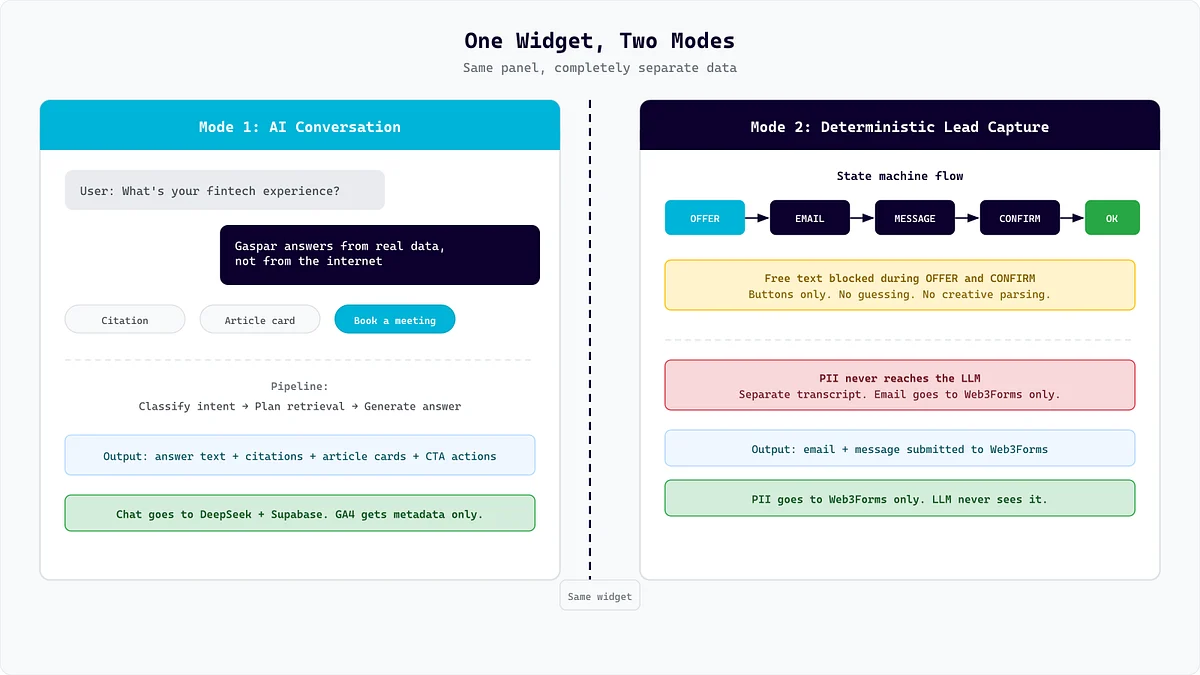
Mode 1: Conversation. Ask a question, and it answers from retrieved project data, site content, FAQs, blog posts, team profiles, and policies. When the evidence is safe and navigable, the response can include a source link; blog routes can also produce separate article recommendations.
Mode 2: Lead capture. Depending on the visitor’s question, deterministic action rules can offer an in-chat message through Gaspar, a meeting link, a full contact form, or the careers email.
If they choose to message through Gaspar, the flow becomes guided: email, optional message, confirmation, submit. No LLM decides these steps. The lead fields are submitted through Web3Forms and lead-capture messages are excluded from the chat history sent to the answer model. That does not mean the transcript is never stored: the widget’s conversation logger can save loggable messages, including lead-capture messages, in Supabase with the message payload encrypted at rest. Our Privacy Policy explains how assistant conversations are handled.
Gaspar can also start the conversation itself. Once the site loading sequence is done, an inactivity timer waits ten seconds and resets on scrolling, wheel, or touch movement. The offer can appear on any page except the contact page. Closing or declining it suppresses the offer for the browser session; choosing “Don’t show me again” suppresses it for two days.
The pipeline in thirty seconds
Here’s what happens between “user types a question” and “answer appears”:
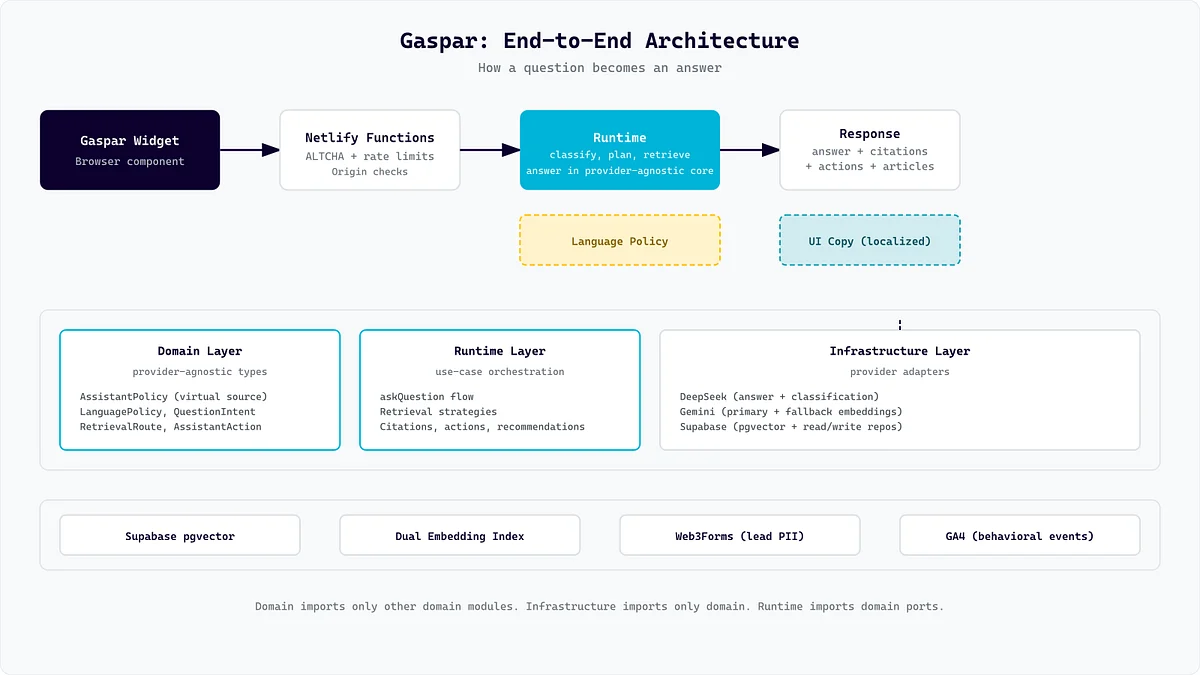
- Fetch and solve a proof-of-work challenge. When the widget opens, it starts preparing an ALTCHA PBKDF2/SHA-256 challenge in background Web Workers. A valid proof is reused while it remains fresh; if it is not ready or has expired, submission waits for a new one.
- Classify intent. Our DeepSeek provider asks the configured chat model whether this is small talk, an unsupported topic, a request to transform the previous answer, or a real question about ARG. Only RAG questions continue into retrieval.
- Plan retrieval. “What’s your experience with fintech, and who’s your Go expert?” is really two questions. The planner can split a message into as many as six standalone retrieval questions and assigns each a mode, entity, and subject.
- Retrieve context. Each sub-question resolves to a route such as portfolio work, commercial delivery, open source, link actions, people, careers, blog, technology quality, or company services. Some routes use Gemini embeddings and Supabase pgvector. Others use lexical technology matches, source keys, first chunks, publication dates, project ranking, or named entities.
- Generate the answer. The configured DeepSeek chat model reads the recent chat history plus numbered evidence blocks, follows a code-defined response policy, and produces a plain-text answer.
- Decide what to offer next. Deterministic question patterns, not another model call, attach actions such as sending a message, booking a meeting, opening the contact form, or emailing the careers team.
- Count the calls accurately. A normal RAG answer uses three DeepSeek calls: intent, retrieval plan, and answer. Intent and planning use temperature 0; answer and fallback prose use 0.2. Semantic routes may also call Gemini for query embeddings, which is a separate model operation rather than one of those three chat-model calls. The current API returns the completed answer rather than streaming tokens.
Small talk and unsupported messages normally stop after classification because that response is included in the classifier output. A conversation transform can add one rewrite call. A no-context RAG path may stop after two chat calls with a deterministic unconfirmed-technology response, or use a third call for an insufficient-context handoff. Ambiguous person references use the third call to ask for clarification.
What makes this different from a chat bubble
The architecture decisions that matter most aren’t the ones you’d find in a tutorial:
- Intent classification saves retrieval work and reduces opportunities for unsupported answers. Small talk and off-topic requests usually stop before the planner and corpus retrieval.
- Gaspar understands language preference. Response language combines lightweight local detection, the classifier’s language field, explicit language requests, and an in-memory preference for the current widget session. The widget copy itself, including buttons, placeholders, and status messages, can be translated through a separate UI-copy endpoint.
- Lead capture is strict, not conversational. We tried letting the AI pull emails out of normal conversation. It was creative, but occasionally wrong. Now it is a state machine with buttons and strict validation.
- Lead details stay out of answer generation. The deterministic lead flow is not included in the chat history sent to the LLM. Conversation logging is a separate path and stores its payload encrypted at rest, so “not sent to the model” should not be confused with “not retained.”
- Dead ends should still be useful. An unconfirmed technology gets a deterministic, non-claiming response; missing evidence gets an insufficient-context answer and a contact action; ambiguous people questions ask for a name. The policy is to distinguish what we can confirm from what needs human follow-up.
- Security with little visible friction. Proof preparation starts in the background, while same-origin checks, Netlify’s edge limit, and application-level per-IP and global limits protect the public endpoint. A fresh or expired challenge can still add a short wait, so we treat “invisible” as a goal rather than a guarantee.
Why this series
Building Gaspar took us through problems we didn’t anticipate: an idiom in our copy (“go-to production languages”) that the model interpreted as evidence we use Go. Rate-limiting a public AI endpoint without breaking the experience for real users. Deciding when to trust the model and when to use a state machine instead.
In the next four parts, we’ll open up the pieces:
- Part 2: The four-intent pipeline - classification, conversation transforms, retrieval planning, and answer generation;
- Part 3: Knowledge design - how we structure company data for retrieval;
- Part 4: Guardrails - the Go idiom story, evidence firewalls, and why deterministic beats conversational for PII;
- Part 5: Operations and growth - ALTCHA, rate limits, request ceilings and cost controls, and the conversion funnel that measures it all.
If you want to see Gaspar in action, it’s live at arg.software. Ask it about our stack. Ask it about hiring. Ask it what happens when you mention a technology we have not documented, and watch how it separates evidence from a sales handoff.
Next: Part 2 - “Three LLM Calls per Question: A RAG Pipeline That Knows What It’s Doing”